

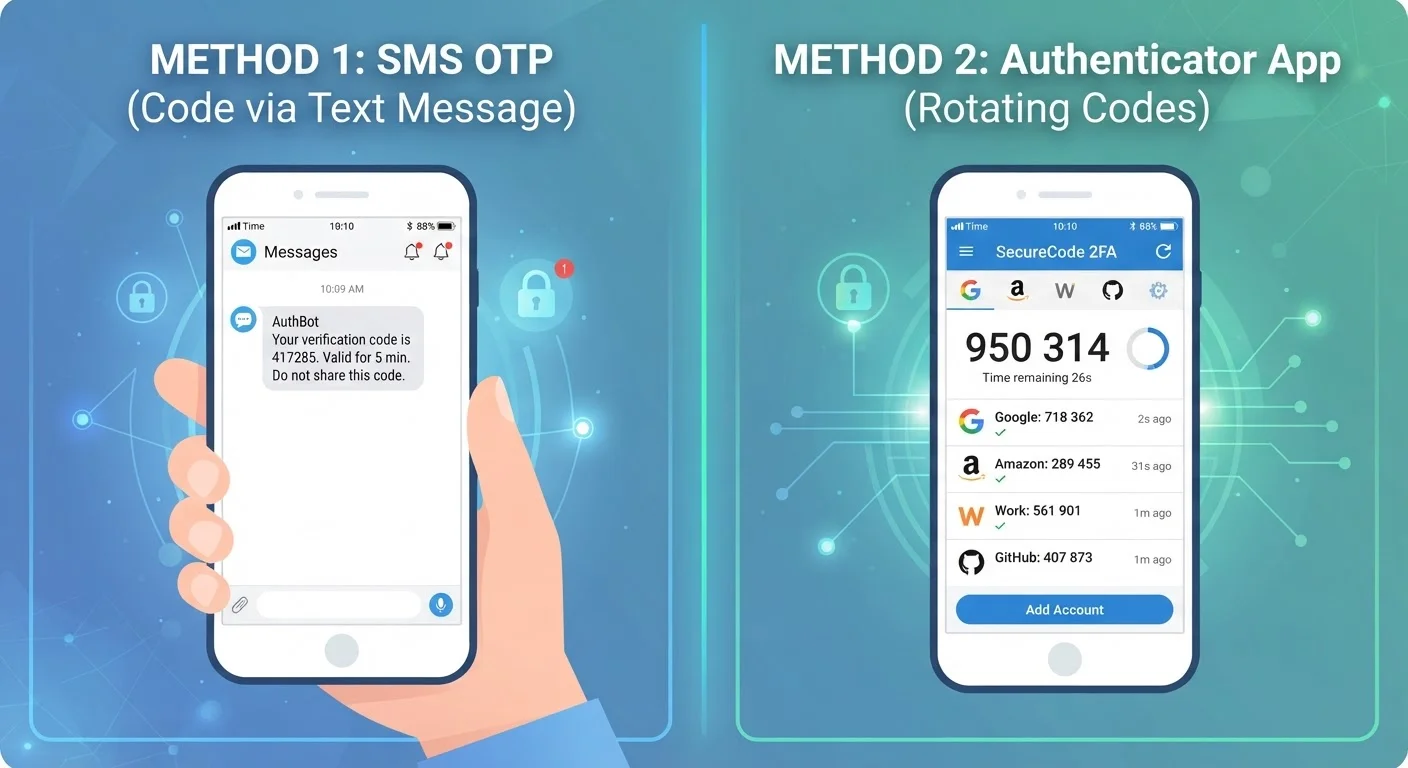
Option A
SMS-Based 2FA
The familiar, widely available second-factor method.
Best for: Users who want a quick setup and don't have access to a smartphone app.
Option B
Authenticator Apps
The more secure, app-based alternative to SMS codes.
Best for: Users who want stronger protection and are comfortable installing a dedicated app.
What Both Methods Are Actually Doing
Two-factor authentication (2FA) requires you to prove your identity in two separate ways - typically something you know (your password) and something you have (a temporary code). Both SMS codes and authenticator apps supply that second factor, but they generate and deliver it very differently.
With SMS-based 2FA, after you enter your password, the service sends a short numeric code to your registered phone number via text message. You enter that code to complete the login.
With an authenticator app, your phone generates a time-limited code locally - no text message is ever sent. The app and the service share a secret key set up during a one-time enrollment. Every 30 seconds, both sides independently calculate the same code using that key and the current time. If the codes match, you're in.
For a broader look at how 2FA works and why it matters, see our introduction to two-factor authentication.
| Criterion | SMS-Based 2FA | Authenticator Apps |
|---|---|---|
| Setup difficulty | Very easy - just a phone number | Easy - requires app install and QR scan |
| Requires cell signal | Yes - to receive the text | No - codes generated locally |
| Vulnerable to SIM swapping | Yes | No |
| Code interception risk | Low but possible via SS7 or malware | Very low - no transmission involved |
| Works without a smartphone | Yes - any phone can receive SMS | No - requires a compatible device |
| Code expiry window | Varies by service (often 5-10 minutes) | 30 seconds (TOTP standard) |
| Overall security level | Good | Better |
Where SMS Falls Short - and Why It Still Beats Nothing
The core vulnerability of SMS-based 2FA is that it depends on your phone number, not your physical device. A technique called SIM swapping exploits this: an attacker convinces your mobile carrier to transfer your number to a SIM card they control. After that, any SMS code sent to your number goes to them instead of you.
SMS codes are also potentially exposed to SS7 protocol weaknesses - a set of decades-old telecom signaling rules that researchers have demonstrated can be exploited to intercept messages in some circumstances. These are real risks, though SIM-swap attacks are far more common in practice.
80%+
Breaches involving stolen credentials
Verizon's Data Breach Investigations Report has consistently found that the majority of hacking-related breaches involve compromised passwords, underscoring why any second factor matters.
~2,000
SIM-swap complaints filed with the FCC annually
The U.S. Federal Communications Commission has documented thousands of SIM-swapping complaints, reflecting how actively this attack vector is exploited.
That said, the vast majority of account breaches still involve stolen passwords with no second factor at all. SMS-based 2FA closes that gap substantially. If SMS is the only option a service offers, using it is meaningfully better than skipping 2FA entirely. Pairing any second factor with strong, unique passwords - a topic covered in our guide to passwords - raises your protection further.
Why Authenticator Apps Are the Stronger Choice
Authenticator apps sidestep SMS vulnerabilities entirely because they have nothing to do with your phone number. The code lives on your device, generated fresh every 30 seconds using a shared secret established only at setup. There is no text to intercept and no carrier to deceive.
Additional advantages include:
- Offline functionality: Codes generate without cell service or Wi-Fi.
- Speed: No waiting for a text that may be delayed by network congestion.
- Phishing resistance: Because codes are time-locked to 30-second windows and tied to specific services, they have extremely limited usefulness if captured.
Back Up Your Authenticator App
If you lose or replace your phone without backing up your authenticator app, you can lose access to every account enrolled in it. Most authenticator apps offer an encrypted backup or account-transfer feature. Enable it during setup, and store any printed recovery codes in a secure location. This step is easy to overlook and important not to skip.
Setting up an authenticator app typically takes under five minutes. Most services display a QR code during 2FA enrollment; you scan it with the app and the shared secret is exchanged automatically. From that point on, the app lists a rotating code for each account you've enrolled.
Understanding how this fits into your broader device security habits is worthwhile - our overview of device security principles puts it in context.
The content on this site is for informational purposes only and is not a substitute for professional advice. Always consult a qualified professional for guidance specific to your situation.