

Our Verdict
Neither mesh nor single-router setups are universally superior - the right fit depends on your home's square footage, construction materials, and the number of devices you run. For compact, open spaces, a well-placed single router typically delivers reliable performance at lower cost. For larger, multi-level, or obstacle-heavy homes, a mesh system offers a more seamless and scalable solution.
| Best for | Recommended |
|---|---|
| Small apartments or open-plan homes under 1,500 sq ft | Traditional Single Router |
| Multi-story homes, large footprints, or thick-walled layouts | Mesh Network System |
| Budget-conscious households with straightforward connectivity needs | Traditional Single Router |
| Households with many devices spread across different rooms or floors | Mesh Network System |
How Each Approach Works
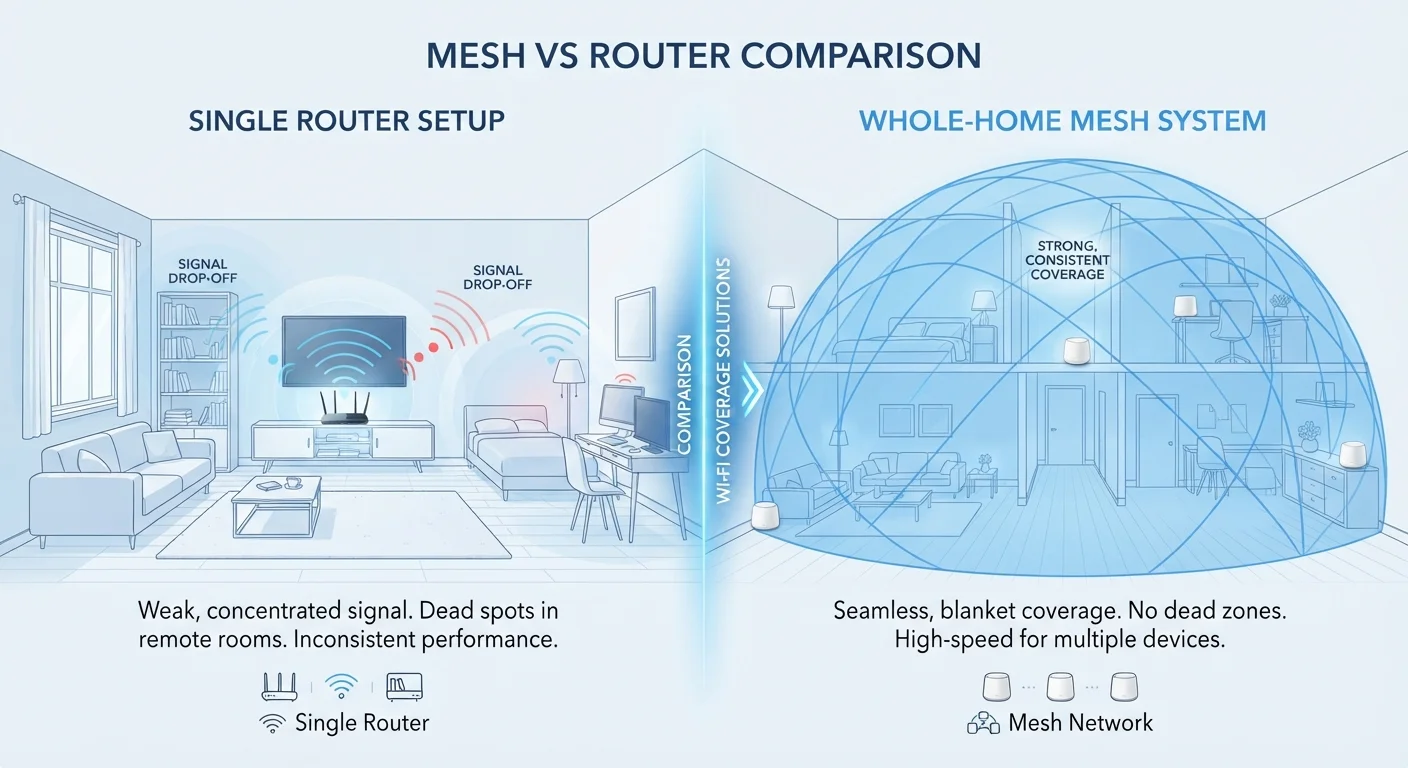
A traditional router is a single device that broadcasts your Wi-Fi signal from one fixed point. It connects to your modem and distributes internet access to every device in range. If you're unsure how routers and modems differ, our explainer on how modems and routers work together is a helpful starting point.
A mesh network, by contrast, uses multiple nodes - a primary unit that connects to your modem, plus one or more satellite units placed around your home. These nodes communicate with each other to create a single, unified Wi-Fi network. Your devices automatically connect to whichever node provides the strongest signal, reducing the dead zones that plague large or complex spaces.
The key difference is coverage strategy: a single router broadcasts outward from one location, while mesh distributes coverage from multiple points simultaneously.
When a Single Router Is Enough
For many households, a traditional router is entirely adequate - and adding hardware they don't need only adds cost and complexity. A single router tends to work well when:
- Your home is under roughly 1,500 square feet with an open floor plan
- Your internet-using spaces are close to where the router is installed
- Walls between rooms are standard drywall rather than concrete, brick, or metal
- You have a moderate number of connected devices
Placement makes a significant difference. A router tucked behind a TV cabinet or buried in a closet loses meaningful signal strength. Positioning it centrally and at mid-height can dramatically improve coverage. Our guide on habits that quietly undermine your home network's performance covers placement missteps worth avoiding.
Start With Router Placement Before Upgrading
Before investing in a mesh system, try relocating your existing router to a more central position in your home. Moving it away from walls, corners, and electronic interference sources (like microwaves) can recover surprising amounts of signal strength. A better-placed router often outperforms a poorly placed upgrade.
When Mesh Makes More Sense
Mesh systems become the stronger choice when a single router physically cannot reach every area of your home effectively. Common scenarios include:
- Multi-story homes where signals weaken between floors
- Older homes with plaster, brick, or concrete walls that block radio signals
- Homes over 2,000 square feet with multiple wings or separated rooms
- Outdoor spaces like patios or garages that need coverage
One common workaround for traditional routers is adding a Wi-Fi range extender, but extenders create a separate network name, can halve throughput speeds, and often require manual switching between networks. Mesh nodes, by contrast, operate as one seamless network managed through a single app.
For households in larger properties, our dedicated comparison of mesh vs. traditional routers for larger homes goes deeper on multi-story considerations.
| Traditional Single Router | Mesh Network System | |
|---|---|---|
| Typical upfront cost | Lower - one device | Higher - multiple nodes |
| Coverage area | Best for smaller, open spaces | Suited to large or complex layouts |
| Dead zone handling | Limited without extenders | Strong - nodes fill gaps |
| Ease of expansion | Requires extenders (separate networks) | Add nodes to existing system |
| Network management | Browser-based admin panel | Smartphone app (usually) |
| Setup complexity | Simple, minimal hardware | Slightly more steps, multi-node placement |
| Wall/obstacle penetration | Degrades with thick materials | Multiple nodes compensate better |
Cost, Setup, and Security Considerations
Traditional routers vary widely in price depending on capability, but a solid standalone unit is generally less expensive than a full mesh kit. Mesh systems - which typically include two or three nodes - carry a higher upfront cost, though prices have come down significantly as the technology has matured.
Setup complexity is roughly comparable for basic use. Both types are designed for consumer self-installation, and setting up a home network for the first time follows a similar process regardless of which hardware you choose.
On the security front, the same principles apply to both setups. Using a strong, unique Wi-Fi password, keeping firmware updated, and disabling features you don't use (like remote management) are habits that matter for any home network. Our article on practical home network security habits outlines the fundamentals clearly.
One note on mesh privacy: many mesh systems rely on companion apps and cloud management, which means some network data may be processed by the manufacturer. Check the privacy policy of any system you consider if that's a concern.
Hardware Upgrades Won't Exceed Your ISP's Speed Cap
A mesh system or high-end router cannot deliver faster internet than your internet service plan allows. If your speeds are consistently slower than your plan promises, contact your internet service provider before investing in new hardware. The bottleneck may be outside your home entirely.
The content on this site is for informational purposes only and is not a substitute for professional advice. Always consult a qualified professional for guidance specific to your situation.