

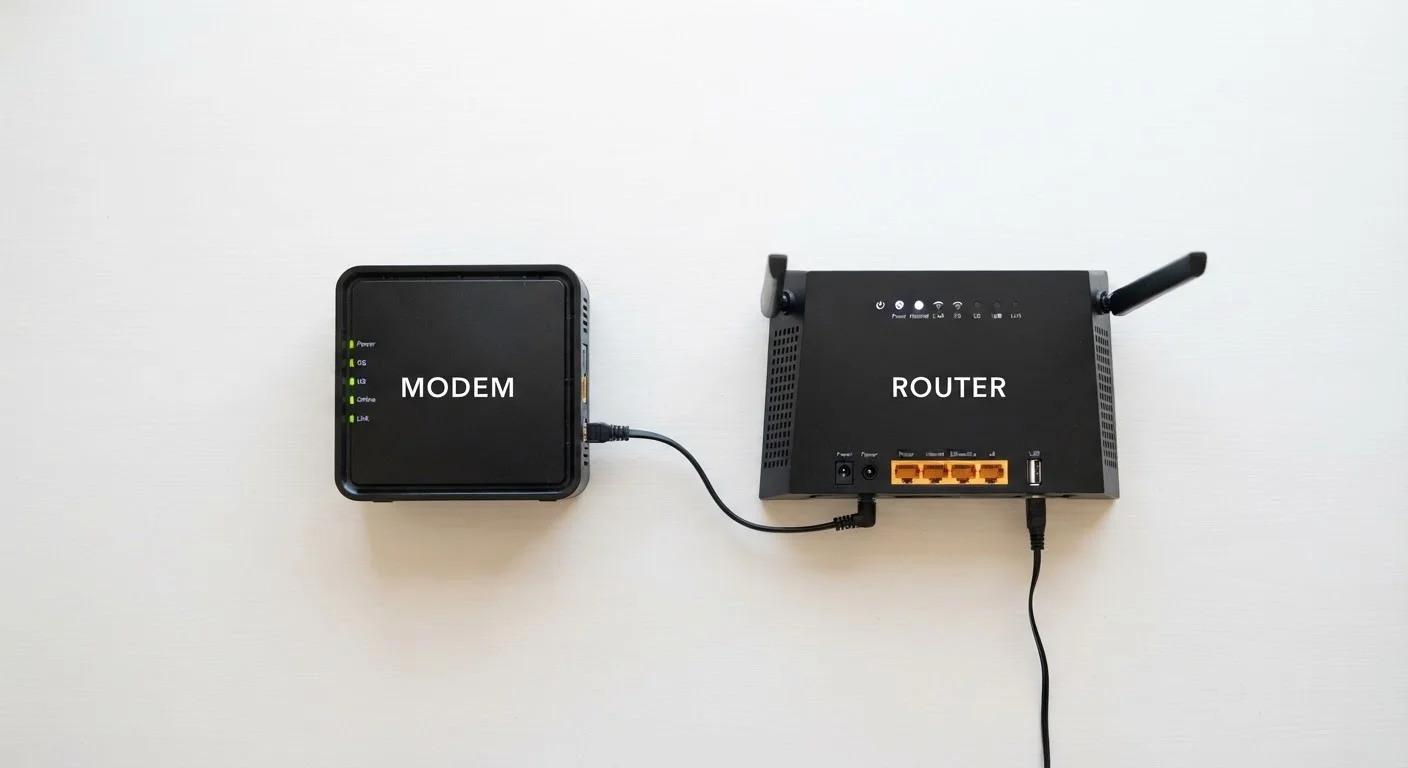
Option A
Modem
The gateway between your home and the internet.
Best for: Translating your ISP's signal into a format your home network can use.
Option B
Router
The traffic director inside your home network.
Best for: Distributing an internet connection to multiple devices via Wi-Fi or ethernet.
What Each Device Actually Does
Think of getting internet at home as a two-stage process. First, your internet service provider (ISP) delivers a signal to your home - through a cable, a phone line, or fiber optic cable. That signal is not immediately usable by your laptop or phone. A modem (short for modulator-demodulator) translates that incoming signal into a digital data format that home devices understand, and vice versa. Without a modem, nothing in your home can communicate with the ISP.
Once the modem has done its job, you have a working internet connection - but only for a single device plugged directly into the modem via an ethernet cable. That is where the router comes in. A router takes that single connection and creates a local network, sharing access among all your devices. It also assigns each device its own internal address and manages the flow of data between them. The Wi-Fi your phone connects to is broadcast by the router, not the modem.
To learn more about how your router manages wireless signals across different frequencies, see our article on how Wi-Fi bands actually work.
Side-by-Side: Key Differences
The table below summarizes how modems and routers differ across the dimensions that matter most for everyday home use.
| Criterion | Modem | Router |
|---|---|---|
| Primary job | Connects home to ISP | Distributes connection to devices |
| What it talks to | Your ISP's infrastructure | Devices inside your home |
| Creates Wi-Fi? | No | Yes |
| Required for internet? | Yes | Only if connecting multiple devices |
| Affects plan speed cap? | Yes (must support your plan tier) | No (but affects in-home throughput) |
| Typical placement | Where cable or phone line enters home | Central location for best coverage |
One nuance worth noting: the speed of your internet plan is determined by your ISP contract and your modem's capability - not your router. If your plan provides 200 Mbps, your router cannot make it faster. However, a poor router can make it feel slower by creating bottlenecks inside your home network.
What ISPs Mean by 'Gateway'
When an ISP refers to a 'gateway' device, they almost always mean a combo modem-router unit. This terminology can be confusing because a gateway technically refers to any device that bridges two different networks. In everyday ISP usage, however, it simply means the single box they provide that handles both internet connection and home Wi-Fi. Knowing this helps when reading ISP documentation or calling support.
Combo Units, Separate Devices, and What ISPs Typically Provide
Most ISPs in the US supply a combo unit - a single box that functions as both modem and router. These are convenient and require minimal setup, which is why they are the default for many households. However, combo units often lag behind standalone devices in performance and feature options.
Tech-savvy households sometimes choose to use a separate modem and router - a setup known as running your own equipment. This can offer more control, better Wi-Fi performance, and may eliminate a monthly equipment rental fee that some ISPs charge. The trade-off is greater complexity when setting up and troubleshooting.
If you are setting up a home network from scratch, our step-by-step home network setup guide walks through the full process in plain language.
~64%
US households using ISP-supplied equipment
According to research from the Leichtman Research Group, a significant majority of US broadband subscribers use equipment rented or provided by their ISP rather than purchasing their own.
$10-$15/mo
Typical ISP equipment rental fee
Many major US ISPs charge a monthly rental fee for their combo gateway unit, which over time can exceed the cost of purchasing equivalent standalone equipment.
Troubleshooting: Which Device Is the Problem?
Knowing the difference between these two devices makes diagnosing problems much faster. Use this simple logic:
- No internet at all, on any device: Restart the modem first. If the issue persists, contact your ISP - the problem may be on their end.
- Internet works when plugged in but not over Wi-Fi: The modem is fine; the router needs attention. Try restarting the router or checking its settings.
- Slow speeds on one device but not others: The modem and router are likely fine. The issue is with that specific device or its wireless adapter.
- Weak signal in certain areas: A router placement or range issue. Consider repositioning the router or exploring options like a mesh network. Our comparison of mesh networks vs. traditional routers can help you weigh your options.
For a deeper look at how wired vs. wireless connections differ in everyday performance, see our article on wired vs. wireless trade-offs.
The content on this site is for informational purposes only and is not a substitute for professional advice. Always consult a qualified professional for guidance specific to your situation.